
Stage Traxx 33.8.33 - App Store
You'll be able to see results in few seconds.
Publisher Description
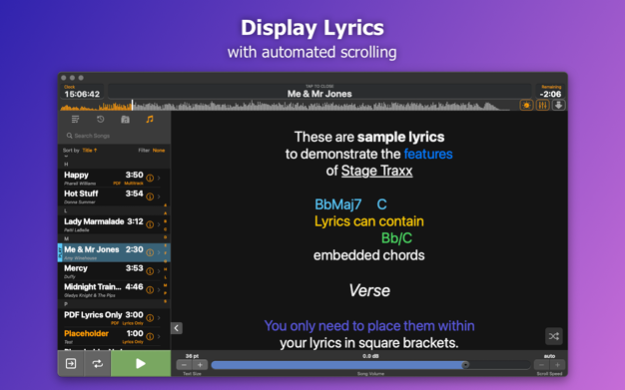
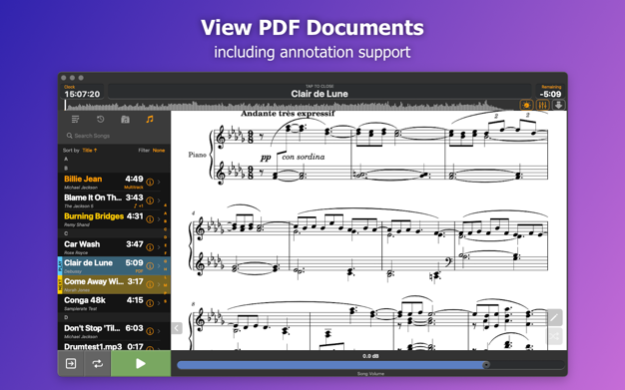
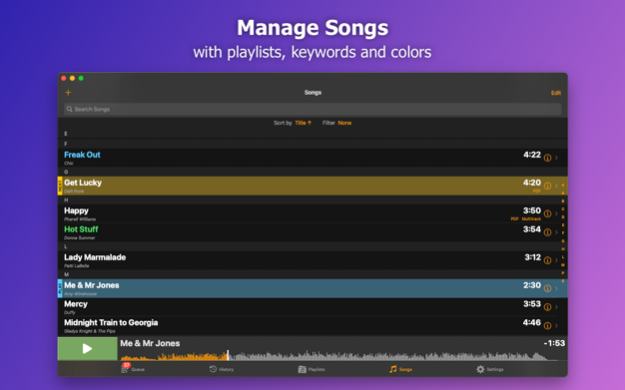
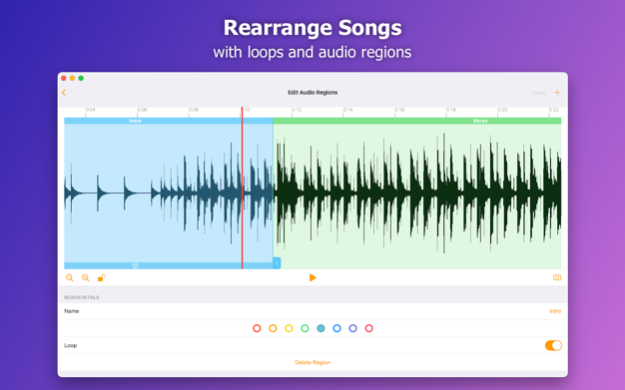
Stage Traxx is an audio player designed for professional musicians working with backing tracks. With Stage Traxx 3, controlling your live performance will be easier than ever before.
Whether you work with prepared playlists or decide on the fly which track to play next, whether you need lyrics, sheets or only a rock solid audio player, Stage Traxx is the right tool for the job.
PLAYBACK
• Display lyrics or PDF files
• Automatic scrolling during playback
• Rearrange songs with loops and audio regions
• Multitrack playback with up to 8 stereo tracks
• Support for up to 18 separate outputs on multichannel audio interfaces
• Separate volume, pitch, speed and equalizer settings for each track
• Add AUv3 plugin as master effect
• Support for Audiobus 3
• Configurable crossfades
ORGANIZE
• Keep all your devices in sync through iCloud
• Unlimited number of playlists
• Assign colors and keywords to songs and playlists
• Complex sorting and filtering options
• Keep track which songs you have played
CONTROL
• Remote control via Airturn, Bluetooth MIDI and MIDI
• Control external gear by sending MIDI commands during playback
• Send MIDI Timecode and MIDI Clock to synchronize other devices
SHARE
• Share songs and playlists with lyrics and all metadata with other users
• Network sessions to send lyrics or PDF document of the current track to other iOS devices via WiFi
FREE VERSION LIMITATIONS
• You can only import up to 6 songs
• Restore of backups is not available
• Network Sessions are not available
• iCloud Sync is not available
To remove these limitations, please unlock the full version via one time In App Purchase.
Jul 29, 2025
Version 3.8.33
ADDED
* Support for importing synchronized lyrics from MP3 files via the ID3 SYLT tag
FIXED
* Potential battery drain when Background App Refresh is enabled
* MIDI events at the start of songs could be skipped when Autoplay is active
About Stage Traxx 3
The company that develops Stage Traxx 3 is Peter Dikant. The latest version released by its developer is 3.8.33.
To install Stage Traxx 3 on your iOS device, just click the green Continue To App button above to start the installation process. The app is listed on our website since 2025-07-29 and was downloaded 0 times. We have already checked if the download link is safe, however for your own protection we recommend that you scan the downloaded app with your antivirus. Your antivirus may detect the Stage Traxx 3 as malware if the download link is broken.
How to install Stage Traxx 3 on your iOS device:
- Click on the Continue To App button on our website. This will redirect you to the App Store.
- Once the Stage Traxx 3 is shown in the iTunes listing of your iOS device, you can start its download and installation. Tap on the GET button to the right of the app to start downloading it.
- If you are not logged-in the iOS appstore app, you'll be prompted for your your Apple ID and/or password.
- After Stage Traxx 3 is downloaded, you'll see an INSTALL button to the right. Tap on it to start the actual installation of the iOS app.
- Once installation is finished you can tap on the OPEN button to start it. Its icon will also be added to your device home screen.
Program Details
System requirements
Download information
Pricing
Version History
version 3.8.33
posted on 2025-07-29
Jul 29, 2025
Version 3.8.33
ADDED
* Support for importing synchronized lyrics from MP3 files via the ID3 SYLT tag
FIXED
* Potential battery drain when Background App Refresh is enabled
* MIDI events at the start of songs could be skipped when Autoplay is active
version 3.8.31
posted on 2025-05-07
May 7, 2025
Version 3.8.31
FIXED
* Possible hanging when starting playback with certain file encodings and a mix of short and long tracks in a multitrack songs
* Random start playback issue where multitrack songs would not start playing
* Artist field in song details can not be cleared
version 3.8.30
posted on 2025-04-09
Apr 9, 2025
Version 3.8.30
FIXED
* Jitter in generated MIDI clock signal
* Manual scrolling override not working for network clients
* Temporary files not deleted in certain error situations
* App icon a bit too large
version 3.8.29
posted on 2025-03-15
Mar 15, 2025
Version 3.8.29
FIXED
* Unreliable PDF scrolling
* Possible crash when adding a playlist to the queue
* Highlighting issues with timestamps placed in the middle of lines containing inline chords
* Detection of available storage space on very large SSDs
version 3.8.28
posted on 2025-02-23
Feb 23, 2025
Version 3.8.28
CHANGED
* Add songs to playlist dialog no longer closes when clicking outside of the dialog
FIXED
* Crash when importing mp3 files with a size of 0 bytes
version 3.8.27
posted on 2025-02-17
Feb 17, 2025
Version 3.8.27
ADDED
Stage Traxx can now import synchronized lyrics from mp3 files with Lyrics3v2 tags
FIXED
* Audio output stops on some iOS devices when switching to other audio apps
* Song transpose settings not applied when exporting rendered lyrics as pdf
version 3.8.24
posted on 2025-01-04
Jan 4, 2025
Version 3.8.24
CHANGED
* Playback in audio region editor will jump back to selected region when reaching any region border
* Global midi on load commands are now sent before the song specific midi on load commands to allow overriding them on a song per song basis
FIXED
* Next region selection does not disable after full cycle through all regions
* Incorrect handling of special characters when sorting playlist items
version 3.8.23
posted on 2024-12-05
Dec 5, 2024
Version 3.8.23
CHANGED
* Opening a playlist will try to focus on next song if there is no current playing song in that playlist
* Audio Region Editor: Moving playhead into current selected region will automatically loop that region
FIXED
* Autoplay not working correctly when transitioning from one playlist to another
* Changing "apply pitch to chords" switch not immediately visible in lyrics
version 3.8.22
posted on 2024-11-04
Nov 4, 2024
Version 3.8.22
CHANGED
* Updated 3rd party components
FIXED
* Timestamps depicting 10 minutes or more are interpreted as chords
version 3.8.20
posted on 2024-09-13
Sep 13, 2024
Version 3.8.20
FIXED
* Crossfade button stays disabled after autoplay into next song
Disclaimer
Official App Store Link
We do not host Stage Traxx 3 on our servers. We did not scan it for viruses, adware, spyware or other type of malware. This app is hosted by Apple and passed their terms and conditions to be listed there. We recommend caution when installing it.
The App Store link for Stage Traxx 3 is provided to you by apps112.com without any warranties, representations or guarantees of any kind, so access it at your own risk.
If you have questions regarding this particular app contact the publisher directly. For questions about the functionalities of apps112.com contact us.
